在发送消息时,需要设置消息的“标记Tag”,Tag用于说明消息的某项特征,消费者可以根据这个特征决定是否接收这些消息。
消息发送者
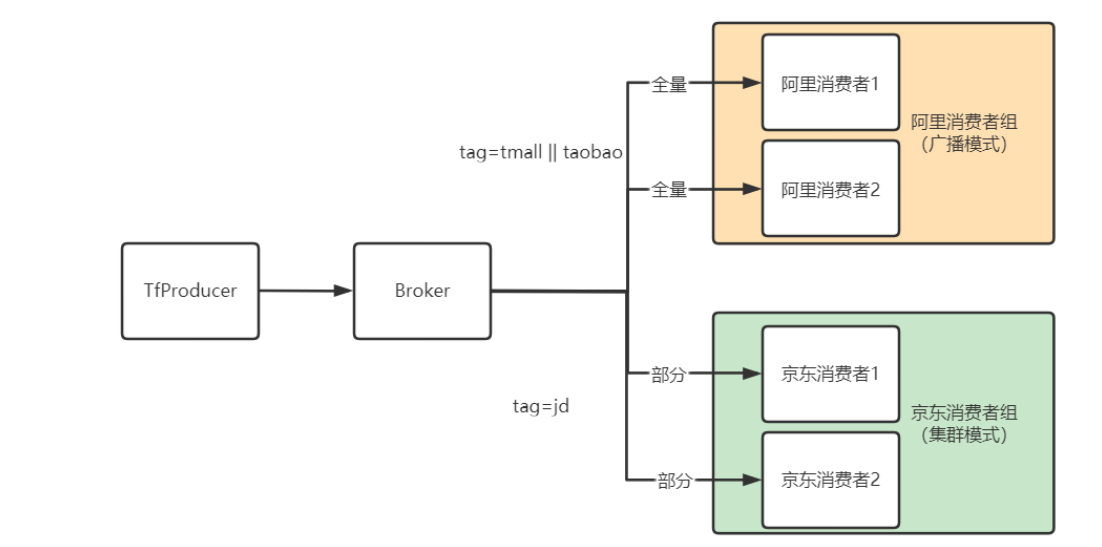
下面案例模拟了来自“京东”、“天猫”、“淘宝”的电商模拟数据,要求负责“阿里”业务的程序消费tmall与taobao的数据,负责“京东”的程序消费“jd”的数据。
1
2
3
4
5
6
7
8
9
10
11
12
13
14
15
16
17
18
19
20
21
22
23
24
25
26
27
28
29
30
31
32
33
34
35
36
37
38
39
40
41
42
43
44
45
46
47
|
@Slf4j
public class TfProducer {
public static void main(String[] args) {
DefaultMQProducer producer = new DefaultMQProducer("tf-producer-group");
producer.setNamesrvAddr("192.168.31.103:9876");
try {
producer.start();
for(Integer i = 0 ; i < 10 ; i++) {
Thread.sleep(1000);
Integer rnd = new Random().nextInt(10);
String tag = "";
switch (rnd % 3){
case 0:
tag = "jd";
break;
case 1:
tag = "tmall";
break;
case 2:
tag = "taobao";
break;
}
String data = "第" + i + "条消息数据";
Message message = new Message("tf-sample-data", tag, i.toString(), data.getBytes());
SendResult result = producer.send(message);
log.info("tag:{},keys:{},data:{}" , tag,i.toString(),data);
}
}catch (Exception e){
e.printStackTrace();
}finally {
try {
producer.shutdown();
log.info("连接已关闭");
}catch (Exception e){
e.printStackTrace();
}
}
}
}
|
运行结果
1
2
3
4
5
6
7
8
9
10
| TfProducer - tag:tmall,keys:0,data:第0条消息数据
TfProducer - tag:jd,keys:1,data:第1条消息数据
TfProducer - tag:tmall,keys:2,data:第2条消息数据
TfProducer - tag:tmall,keys:3,data:第3条消息数据
TfProducer - tag:tmall,keys:4,data:第4条消息数据
TfProducer - tag:taobao,keys:5,data:第5条消息数据
TfProducer - tag:jd,keys:6,data:第6条消息数据
TfProducer - tag:tmall,keys:7,data:第7条消息数据
TfProducer - tag:tmall,keys:8,data:第8条消息数据
TfProducer - tag:jd,keys:9,data:第9条消息数据
|
消息消费者
关键在第12行代码,consumer.subscribe第二个参数指明只消费tag=jd的数据。
1
2
3
4
5
6
7
8
9
10
11
12
13
14
15
16
17
18
19
20
21
22
23
24
25
26
27
28
29
30
| @Slf4j
public class TfJDConsumer {
public static void main(String[] args) throws Exception {
DefaultMQPushConsumer consumer = new DefaultMQPushConsumer("tf-jd-consumer-group");
consumer.setNamesrvAddr("192.168.31.103:9876");
consumer.setMessageModel(MessageModel.CLUSTERING);
consumer.subscribe("tf-sample-data", "jd");
consumer.registerMessageListener(new MessageListenerConcurrently() {
@Override
public ConsumeConcurrentlyStatus consumeMessage(List<MessageExt> list, ConsumeConcurrentlyContext consumeConcurrentlyContext) {
list.forEach(msg->{
log.info( msg.getTags() + ":" + new String(msg.getBody()));
});
return ConsumeConcurrentlyStatus.CONSUME_SUCCESS;
}
});
consumer.start();
log.info("集群消费者启动成功,正在监听新消息");
}
}
|
运行结果
1
2
3
4
| 17:12:25.209 [main] INFO com.lixiang.rocketmq.tagfilter.TfJDConsumer - 集群消费者启动成功,正在监听新消息
17:12:44.418 [ConsumeMessageThread_1] INFO com.lixiang.rocketmq.tagfilter.TfJDConsumer - jd:第1条消息数据
17:12:45.389 [ConsumeMessageThread_2] INFO com.lixiang.rocketmq.tagfilter.TfJDConsumer - jd:第6条消息数据
17:12:47.417 [ConsumeMessageThread_3] INFO com.lixiang.rocketmq.tagfilter.TfJDConsumer - jd:第9条消息数据
|
1
2
3
4
5
6
7
8
| com.lixiang.rocketmq.tagfilter.TfAliConsumer
consumer.subscribe第二个参数指明只消费tag=tmall || taobao的数据,遇到这种多个
DefaultMQPushConsumer consumer = new DefaultMQPushConsumer("tf-ali-consumer-group");
...
consumer.setMessageModel(MessageModel.BROADCASTING);
consumer.subscribe("tf-sample-data", "tmall || taobao");
...
|
运行结果
1
2
3
4
5
6
7
8
| 17:11:26.136 [main] INFO com.lixiang.rocketmq.tagfilter.TfAliConsumer - 广播消费者启动成功,正在监听新消息
17:12:42.376 [ConsumeMessageThread_1] INFO com.lixiang.rocketmq.tagfilter.TfAliConsumer - tmall:第0条消息数据
17:12:43.362 [ConsumeMessageThread_2] INFO com.lixiang.rocketmq.tagfilter.TfAliConsumer - taobao:第2条消息数据
17:12:46.403 [ConsumeMessageThread_3] INFO com.lixiang.rocketmq.tagfilter.TfAliConsumer - taobao:第3条消息数据
17:12:48.441 [ConsumeMessageThread_4] INFOcom.lixiang.rocketmq.tagfilter.TfAliConsumer - taobao:第4条消息数据
17:12:49.444 [ConsumeMessageThread_5] INFO com.lixiang.rocketmq.tagfilter.TfAliConsumer - tmall:第5条消息数据
17:12:50.457 [ConsumeMessageThread_6] INFO com.lixiang.rocketmq.tagfilter.TfAliConsumer - tmall:第7条消息数据
17:12:51.470 [ConsumeMessageThread_7] INFO com.lixiang.rocketmq.tagfilter.TfAliConsumer - tmall:第8条消息数据
|
* :消费所有消息
Tag:只消费指定的Tag
Tag || Tag || Tag:只要有一个Tag符合要求就会被消费
为什么要设置两组不同的消费者组
如果通过不同Tag标注的数据,往往要交由不同的消费者处理,就像当前案例中,“jd”数据被京东消费组处理,“taobao”、“tmall”被阿里消费组处理。这两个消费组可以拥有不同的处理逻辑,例如京东消费者组采用“广播模式”,所有消费者都接收到相同数据;而阿里消费者组则采用“集群模式”将消费分发给不同的消费者实现”负载均衡“功能。如果放在同一个消费者组便无法实现上述功能。
生产者日志:
1
2
3
4
5
6
7
8
9
10
| 17:22:53.539 [main] INFO com.lixiang.rocketmq.tagfilter.TfProducer - tag:tmall,keys:0,data:第0条消息数据
17:22:54.564 [main] INFO com.lixiang.rocketmq.tagfilter.TfProducer - tag:jd,keys:1,data:第1条消息数据
17:22:55.571 [main] INFO com.lixiang.rocketmq.tagfilter.TfProducer - tag:tmall,keys:2,data:第2条消息数据
17:22:56.588 [main] INFO com.lixiang.rocketmq.tagfilter.TfProducer - tag:jd,keys:3,data:第3条消息数据
17:22:57.603 [main] INFO com.lixiang.rocketmq.tagfilter.TfProducer - tag:taobao,keys:4,data:第4条消息数据
17:22:58.612 [main] INFO com.lixiang.rocketmq.tagfilter.TfProducer - tag:tmall,keys:5,data:第5条消息数据
17:22:59.630 [main] INFO com.lixiang.rocketmq.tagfilter.TfProducer - tag:tmall,keys:6,data:第6条消息数据
17:23:00.650 [main] INFO com.lixiang.rocketmq.tagfilter.TfProducer - tag:jd,keys:7,data:第7条消息数据
17:23:01.661 [main] INFO com.lixiang.rocketmq.tagfilter.TfProducer - tag:jd,keys:8,data:第8条消息数据
17:23:02.673 [main] INFO com.lixiang.rocketmq.tagfilter.TfProducer - tag:jd,keys:9,data:第9条消息数据
|
启动两个京东消费者实例的运行结果说明集群模式已生效。
1
2
3
4
5
6
7
| 实例1:
17:22:56.633 [ConsumeMessageThread_1] INFO com.lixiang.rocketmq.tagfilter.TfJDConsumer - jd:第3条消息数据
17:23:01.662 [ConsumeMessageThread_3] INFO com.lixiang.rocketmq.tagfilter.TfJDConsumer - jd:第8条消息数据
17:23:02.673 [ConsumeMessageThread_4] INFO com.lixiang.rocketmq.tagfilter.TfJDConsumer - jd:第9条消息数据
实例2:
17:22:54.562 [ConsumeMessageThread_3] INFO com.lixiang.rocketmq.tagfilter.TfJDConsumer - jd:第1条消息数据
17:23:00.650 [ConsumeMessageThread_2] INFO com.lixiang.rocketmq.tagfilter.TfJDConsumer - jd:第7条消息数据
|