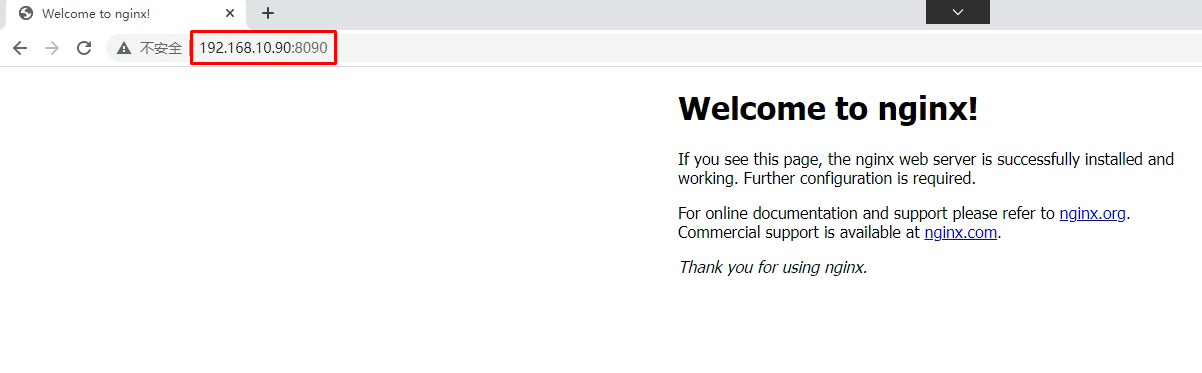
查看service [root@master01 ~]# kubectl get service NAME TYPE CLUSTER-IP EXTERNAL-IP PORT(S) AGE kubernetes ClusterIP 10.96.0.1 <none> 443/TCP 4d15h nginx-svc ClusterIP 10.101.153.50 <none> 80/TCP 3s
1 2 3 4 5
查看endpoints [root@master01 ~]# kubectl get endpoints NAME ENDPOINTS AGE kubernetes 192.168.122.30:64434d15h nginx-svc172.16.189.74:80,172.16.235.150:808s
1 2 3 4 5
查看Pod [root@master01 ~]# kubectl get pods -l app=nginx NAME READY STATUS RESTARTS AGE nginx-server1-77d4c485d8-gsrmq1/1 Running 012s nginx-server1-77d4c485d8-mmc521/1 Running 012s
[root@master01 ~]# curl http://10.101.153.50:80 <!DOCTYPE html> <html> <head> <title>Welcome to nginx!</title> <style> body { width: 35em; margin: 0 auto; font-family: Tahoma, Verdana, Arial, sans-serif; } </style> </head> <body> <h1>Welcome to nginx!</h1> <p>If you see this page, the nginx web server is successfully installed and working. Further configuration is required.</p>
<p>For online documentation and support please refer to <a href="http://nginx.org/">nginx.org</a>.<br/> Commercial support is available at <a href="http://nginx.com/">nginx.com</a>.</p>
<p><em>Thank you forusing nginx.</em></p> </body> </html>
命令 [root@master01 ~]# dig -t A headless-service.default.svc.cluster.local. @10.96.0.2
输出 ; <<>> DiG 9.11.4-P2-RedHat-9.11.4-16.P2.el7_8.2 <<>> -t A headless-service.default.svc.cluster.local. @10.96.0.2 ;; global options: +cmd ;; Got answer: ;; WARNING: .local is reserved for Multicast DNS ;; You are currently testing what happens when an mDNS query is leaked to DNS ;; ->>HEADER<<- opcode: QUERY, status: NOERROR, id: 31371 ;; flags: qr aa rd; QUERY: 1, ANSWER: 1, AUTHORITY: 0, ADDITIONAL: 1 ;; WARNING: recursion requested but not available
;; OPT PSEUDOSECTION: ; EDNS: version: 0, flags:; udp: 4096 ;; QUESTION SECTION: ;headless-service.default.svc.cluster.local. IN A #被解析域名
;; ANSWER SECTION: headless-service.default.svc.cluster.local. 30IN A 10.224.235.147#注意这里IP
;; Query time: 0 msec ;; SERVER: 10.96.0.10#53(10.96.0.2) ;; WHEN: Sun May 1710:58:50 CST 2020 ;; MSG SIZE rcvd: 129
4.1.2.5.3 验证pod的IP
1 2 3 4 5 6 7
命令 [root@master ~]# kubectl get pod -o wide 输出 NAME READY STATUS RESTARTS AGE IP NODE NOMINATED NODE READINESS GATES nginx-deployment-56bf6c9c8c-jmk7r1/1 Running 035m 10.224.235.147 worker1 <none> <none>
命令 [root@master01 ~]# kubectl run bbp --image=busyboxplus:curl -it
或 [root@master01 ~]# kubectl run bbp --image=1.28 -it
输出 If you don't see a command prompt, try pressing enter. 解析域名 nslookup headless-service.default.svc.cluster.local. 访问命令 [ root@bbp:/ ]$ curl http://headless-service.default.svc.cluster.local. 输出 <!DOCTYPE html> <html> <head> <title>Welcome to nginx!</title> <style> body { width: 35em; margin: 0 auto; font-family: Tahoma, Verdana, Arial, sans-serif; } </style> </head> <body> <h1>Welcome to nginx!</h1> <p>If you see this page, the nginx web server is successfully installed and working. Further configuration is required.</p> <p>For online documentation and support please refer to <a href="http://nginx.org/">nginx.org</a>.<br/> Commercial support is available at <a href="http://nginx.com/">nginx.com</a>.</p> <p><em>Thank you for using nginx.</em></p> </body> </html> [ root@bbp:/ ]$ exit Session ended, resume using 'kubectl attach bbp -c bbp -i-t' command when the pod is running
[root@master01 ~]# kubectl get pods NAME READY STATUS RESTARTS AGE nginx-app-ffd5ccc78-cnwbx1/1 Running 08m59s nginx-app-ffd5ccc78-mz77g1/1 Running 08m59s
[root@master01 ~]# kubectl get ns NAME STATUS AGE default Active 16d kube-node-lease Active 16d kube-public Active 16d kube-system Active 16d kubernetes-dashboard Active 13d metallb-system Active 130m test1 Active 12d [root@master01 ~]# kubectl get pods -n metallb-system NAME READY STATUS RESTARTS AGE controller-64f8f944d-qdf8m1/1 Running 0110m speaker-cwzq71/1 Running 0110m speaker-qk5fb1/1 Running 0110m speaker-wsllb1/1 Running 0110m speaker-x4bwt1/1 Running 0110m
[root@master01 ~]# kubectl get svc NAME TYPE CLUSTER-IP EXTERNAL-IP PORT(S) AGE kubernetes ClusterIP 10.96.0.1 <none> 443/TCP 16d nginx-metallb LoadBalancer 10.105.239.69192.168.10.908090:31372/TCP 106m
[root@master01 ~]# ping 192.168.10.90 PING 192.168.10.90 (192.168.10.90) 56(84) bytes of data. 64 bytes from 192.168.10.90: icmp_seq=1 ttl=64 time=3.45 ms 64 bytes from 192.168.10.90: icmp_seq=2 ttl=64 time=0.040 ms
[root@master01 ~]# curl http://192.168.122.90:8090 <!DOCTYPE html> <html> <head> <title>Welcome to nginx!</title> <style> body { width: 35em; margin: 0 auto; font-family: Tahoma, Verdana, Arial, sans-serif; } </style> </head> <body> <h1>Welcome to nginx!</h1> <p>If you see this page, the nginx web server is successfully installed and working. Further configuration is required.</p>
<p>For online documentation and support please refer to <a href="http://nginx.org/">nginx.org</a>.<br/> Commercial support is available at <a href="http://nginx.com/">nginx.com</a>.</p>
<p><em>Thank you forusing nginx.</em></p> </body> </html>
[root@master01 ~]# kubectl apply -f ns2-nginx.yml namespace/ns2 created deployment.apps/deploy-nginx created service/svc2 created service/external-svc2 created
3, 在ns1命名空间的pod里验证
1 2 3
[root@master01 ~]# kubectl get pods -n ns1 NAME READY STATUS RESTARTS AGE deploy-nginx-6c9764bb69-g5xl81/1 Running 08m10s
[root@master01 ~]# kubectl get pod -n ns2 NAME READY STATUS RESTARTS AGE deploy-nginx-6c9764bb69-8psxl1/1 Running 081m
[root@master01 ~]# kubectl delete pod deploy-nginx-6c9764bb69-8psxl -n ns2 pod "deploy-nginx-6c9764bb69-8psxl" deleted 因为有replicas控制器,所以删除pod会自动拉一个起来
[root@master01 ~]# kubectl get pod -o wide -n ns2 NAME READY STATUS RESTARTS AGE IP NODE NOMINATED NODE READINESS GATES deploy-nginx-6c9764bb69-8qbz21/1 Running 05m36s 10.3.166.141192.168.122.13 <none> <none>
[root@master01 ~]# kubectl apply -f 02_create_deployment_app_nginx_with_service.yaml deployment.apps/nginx-server1 created service/nginx-svc created
1 2 3 4 5 6 7 8 9 10 11 12 13 14
[root@master01 ~]# kubectl get pods NAME READY STATUS RESTARTS AGE nginx-server1-58845f75f4-9zlnw1/1 Running 02m11s nginx-server1-58845f75f4-ffqdt1/1 Running 02m11s [root@master01 ~]# kubectl exec -it nginx-server1-58845f75f4-9zlnw bash kubectl exec [POD] [COMMAND] is DEPRECATED and will be removed in a future version. Use kubectl kubectl exec [POD] -- [COMMAND] instead. root@nginx-server1-58845f75f4-9zlnw:/# echo web1 > /usr/share/nginx/html/index.html root@nginx-server1-58845f75f4-9zlnw:/# exit exit [root@master01 ~]# kubectl exec -it nginx-server1-58845f75f4-ffqdt bash kubectl exec [POD] [COMMAND] is DEPRECATED and will be removed in a future version. Use kubectl kubectl exec [POD] -- [COMMAND] instead. root@nginx-server1-58845f75f4-ffqdt:/# echo web2 > /usr/share/nginx/html/index.html root@nginx-server1-58845f75f4-ffqdt:/# exit exit
1 2 3 4 5 6 7 8 9 10
[root@master01 ~]# kubectl get svc
NAME         TYPE        CLUSTER-IP     EXTERNAL-IP   PORT(S)   AGE
kubernetes   ClusterIP   10.96.0.1      <none>        443/TCP   16d
nginx-svc    ClusterIP   10.100.53.31   <none>        80/TCP    3m53s
[root@master01 ~]# curl http://10.100.53.31
web1
[root@master01 ~]# curl http://10.100.53.31
web2
或
[root@master01 ~]# while true;do curl 10.100.53.31;sleep 1; done