Web环境AI流式交互
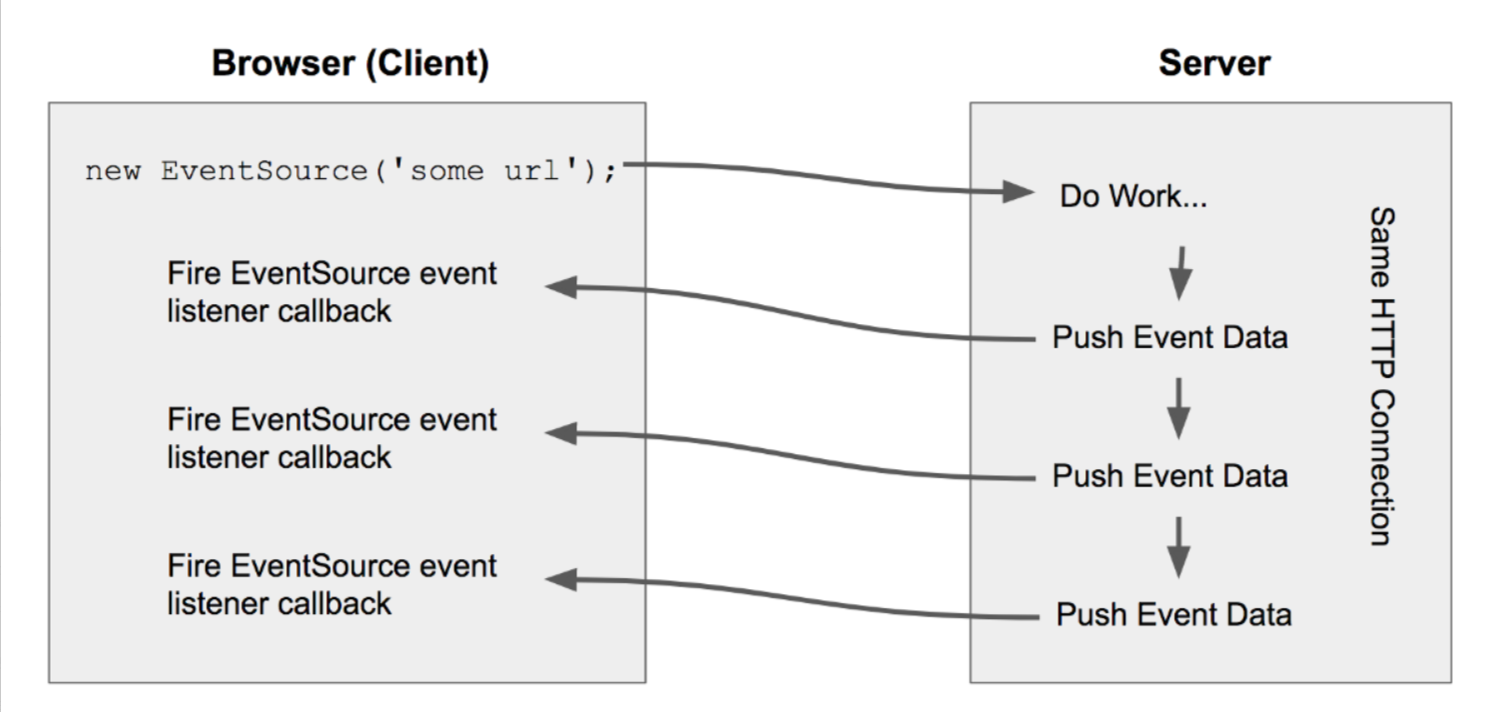
SSE,即服务器发送事件(Server-Sent Events),是一种基于HTTP协议的单向通信技术,允许服务器向客户端持续推送数据。这种技术适用于需要实时更新数据的应用场景,提供了一种简单而高效的实时数据推送解决方案。
以下是SSE的主要特点和工作原理:
一个完整的 SSE 消息可能如下:
1
2
3
4
5
6
| ...
data: {"status": "online", "timestamp": "2023-10-01T12:34:56"}
...
data: Hello, this is a message!
...
data: {"user": "John", "action": "login"}
|
特点
- 单向通信:SSE仅支持从服务器到客户端的单向数据传输。
- 持久连接:SSE使用持久连接,这意味着一旦建立连接,服务器可以在需要时向客户端发送数据,而无需重新建立连接。
- 事件驱动:SSE使用事件驱动模型,服务器可以向客户端发送特定的事件类型和数据。
- 自动重连:如果连接断开,浏览器会自动尝试重新连接。
- 兼容性好:SSE在大多数现代浏览器中都得到支持。
工作原理
- 建立连接:客户端通过创建一个EventSource对象并指定一个URL来与服务器建立连接。
- 发送请求:客户端向服务器发送一个HTTP请求,请求建立SSE连接。
- 服务器响应:服务器收到请求后,返回一个HTTP响应,该响应的Content-Type头部被设置为text/event-stream。
- 数据推送:服务器通过HTTP响应流发送数据,客户端通过JavaScript的EventSource对象监听并接收这些数据。
适用场景
SSE适用于以下场景:
● 实时股票行情更新
● 社交媒体通知
● 新闻推送
● 在线监控
● 实时日志系统
● 协作工具,如文档协作编辑
SSE与WebSocket等其他实时通信技术相比,更适合于单向数据流的场景,因其基于HTTP协议,更加轻量级且易于实现。
1
2
3
4
5
6
7
8
9
10
11
12
13
14
15
16
17
18
19
20
21
22
23
24
25
26
27
28
29
30
31
32
33
34
35
36
37
38
39
40
41
42
43
44
45
46
47
48
49
50
51
52
53
54
55
56
57
58
59
60
61
62
63
64
65
66
67
68
69
70
71
72
73
74
75
76
77
78
79
80
81
82
83
84
85
86
87
88
89
90
| <?xml version="1.0" encoding="UTF-8"?>
<project xmlns="http://maven.apache.org/POM/4.0.0" xmlns:xsi="http://www.w3.org/2001/XMLSchema-instance"
xsi:schemaLocation="http://maven.apache.org/POM/4.0.0 https://maven.apache.org/xsd/maven-4.0.0.xsd">
<modelVersion>4.0.0</modelVersion>
<parent>
<groupId>org.springframework.boot</groupId>
<artifactId>spring-boot-starter-parent</artifactId>
<version>3.4.4</version>
<relativePath/> <!-- lookup parent from repository -->
</parent>
<groupId>com.lixiang</groupId>
<artifactId>langchain4j</artifactId>
<version>0.0.1-SNAPSHOT</version>
<name>ex00700</name>
<description>Demo project for Spring Boot</description>
<url/>
<licenses>
<license/>
</licenses>
<developers>
<developer/>
</developers>
<scm>
<connection/>
<developerConnection/>
<tag/>
<url/>
</scm>
<properties>
<java.version>17</java.version>
</properties>
<dependencies>
<dependency>
<groupId>org.springframework.boot</groupId>
<artifactId>spring-boot-starter-web</artifactId>
</dependency>
<dependency>
<groupId>org.projectlombok</groupId>
<artifactId>lombok</artifactId>
<optional>true</optional>
</dependency>
<dependency>
<groupId>org.springframework.boot</groupId>
<artifactId>spring-boot-starter-test</artifactId>
<scope>test</scope>
</dependency>
<dependency>
<groupId>dev.langchain4j</groupId>
<artifactId>langchain4j-community-dashscope-spring-boot-starter</artifactId>
<version>1.0.0-beta3</version>
</dependency>
<dependency>
<groupId>dev.langchain4j</groupId>
<artifactId>langchain4j-spring-boot-starter</artifactId>
<version>1.0.0-beta3</version>
</dependency>
</dependencies>
<build>
<plugins>
<plugin>
<groupId>org.apache.maven.plugins</groupId>
<artifactId>maven-compiler-plugin</artifactId>
<configuration>
<annotationProcessorPaths>
<path>
<groupId>org.projectlombok</groupId>
<artifactId>lombok</artifactId>
</path>
</annotationProcessorPaths>
</configuration>
</plugin>
<plugin>
<groupId>org.springframework.boot</groupId>
<artifactId>spring-boot-maven-plugin</artifactId>
<configuration>
<excludes>
<exclude>
<groupId>org.projectlombok</groupId>
<artifactId>lombok</artifactId>
</exclude>
</excludes>
</configuration>
</plugin>
</plugins>
</build>
</project>
|
1
2
| langchain4j.community.dashscope.streaming-chat-model.api-key=sk-937aee4*******34d363f5a770
langchain4j.community.dashscope.streaming-chat-model.model-name=qwen-plus
|
1
2
3
4
5
6
7
8
9
10
11
12
13
14
15
16
17
18
19
20
21
22
23
24
25
| package com.lixiang.langchain4j;
import org.springframework.context.annotation.Bean;
import org.springframework.context.annotation.Configuration;
import dev.langchain4j.memory.ChatMemory;
import dev.langchain4j.memory.chat.MessageWindowChatMemory;
@Configuration
public class LangChain4jConfiguration {
@Bean
ChatMemory chatMemory() {
return MessageWindowChatMemory.withMaxMessages(100);
}
}
|
1
2
3
4
5
6
7
8
9
10
11
12
13
14
15
16
17
18
19
20
21
22
23
24
25
| package com.lixiang.langchain4j;
import dev.langchain4j.service.SystemMessage;
import dev.langchain4j.service.TokenStream;
import dev.langchain4j.service.UserMessage;
import dev.langchain4j.service.V;
import dev.langchain4j.service.spring.AiService;
@AiService
interface Assistant {
@SystemMessage("你是香港人,只会使用繁体中文回答问题。")
@UserMessage("你兴奋的跟他说:{{msg}}")
TokenStream chat(@V("msg") String userMessage);
}
|
1
2
3
4
5
6
7
8
9
10
11
12
13
14
15
16
17
18
19
20
21
22
23
24
25
26
27
28
29
30
31
32
33
34
35
36
37
38
39
40
41
42
43
44
45
46
47
48
| package com.lixiang.langchain4j;
import java.io.IOException;
import org.springframework.http.MediaType;
import org.springframework.web.bind.annotation.GetMapping;
import org.springframework.web.bind.annotation.RequestParam;
import org.springframework.web.bind.annotation.RestController;
import org.springframework.web.servlet.mvc.method.annotation.SseEmitter;
import dev.langchain4j.model.chat.response.ChatResponse;
import dev.langchain4j.service.TokenStream;
import jakarta.annotation.Resource;
@RestController
public class ChatController {
@Resource
private Assistant assistant;
@GetMapping(value = "/chat", produces = MediaType.TEXT_EVENT_STREAM_VALUE)
public SseEmitter model(@RequestParam(value = "message", defaultValue = "你好") String message) {
SseEmitter emitter = new SseEmitter();
TokenStream chatStream = assistant.chat(message);
chatStream.onPartialResponse((String partialResponse) -> {
try {
emitter.send(SseEmitter.event().data(partialResponse));
} catch (IOException e) {
emitter.completeWithError(e);
}
})
.onCompleteResponse((ChatResponse response) -> emitter.complete())
.onError((Throwable error) -> emitter.completeWithError(error))
.start();
return emitter;
}
}
|